
Flash Card Wizard1.0.13 - Get APK
You'll be able to download in few seconds.
Publisher Description
** Free version is ad supported **
A simple and straightforward flash card maker / creator, designed with ease of use, simplicity, and clean design in mind.
Features:
- Backup/restore database of cards for easy transfer between devices
- Allows for images via Camera, Gallery, or create your own using the built in sketch feature.
- Mark cards as known after memorizing them
- Sort cards alphabetically, by creation, modification, pending, complete
- Timer
- Record / attach audio files
Usage:
To begin, first create a new deck of cards by hitting the pencil icon in the upper right of the title bar. Next, be sure to give the deck a meaningful name for easy reference. You can edit and delete decks via long pressing on them. Once the deck is created you can begin making cards.
To make a card, select the desired deck from the main screen. This will bring you to a new screen. Similar to deck creation, select the pencil icon in the top right. This will bring you to a new screen where you can input the question, answer, and if you like a picture. Hit the check mark in the upper right to save the card.
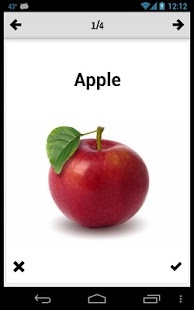
To view a card or cards select the deck and then the card where you would like to begin. You can use the left and right arrow icons in the title bar to navigate between cards. To view the answer of a question, press anywhere on the card to display the answer. If you like, you can use the "x" and check mark icons beneath a card to mark a card as completed or not. This is totally optional but helps you keep track of what you need to know and what you already know. You can edit,delete,mark status of cards by long pressing them from listing screen.
To sort through cards or decks you can select the gear icon in the upper left of the title bar. To backup/restore, reset cards decks, you can find these options in the menu.
About Flash Card Wizard
The company that develops Flash Card Wizard is Fluffy Delusions. The latest version released by its developer is 1.0.13.
To install Flash Card Wizard on your Android device, just click the green Continue To App button above to start the installation process. The app is listed on our website since 2018-01-20 and was downloaded 0 times. We have already checked if the download link is safe, however for your own protection we recommend that you scan the downloaded app with your antivirus. Your antivirus may detect the Flash Card Wizard as malware as malware if the download link to com.fluffydelusions.app.flashcardcreator is broken.
How to install Flash Card Wizard on your Android device:
- Click on the Continue To App button on our website. This will redirect you to Google Play.
- Once the Flash Card Wizard is shown in the Google Play listing of your Android device, you can start its download and installation. Tap on the Install button located below the search bar and to the right of the app icon.
- A pop-up window with the permissions required by Flash Card Wizard will be shown. Click on Accept to continue the process.
- Flash Card Wizard will be downloaded onto your device, displaying a progress. Once the download completes, the installation will start and you'll get a notification after the installation is finished.
Program Details
System requirements
Download information
Pricing
Version History
version 1.0.13
posted on 2018-01-20
Updated Google Play Services
version 1.0.11
posted on 2013-08-07
* You can now use an image as an answer,* Various layout updates that displays more useful info
version 1.0.11
posted on 2013-05-03
Several fixes and updates
Disclaimer
External Download
We do not host Flash Card Wizard on our servers. We did not scan it for viruses, adware, spyware or other type of malware. This app is hosted by Galad and passed their terms and conditions to be listed there. We recommend caution when installing it.
The APK Download link for Flash Card Wizard is provided to you by apps112.com without any warranties, representations or guarantees of any kind, so access it at your own risk.
If you have questions regarding this particular app contact the publisher directly. For questions about the functionalities of apps112.com contact us.
